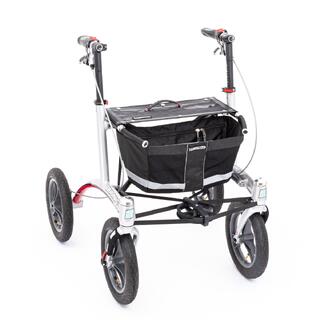
Trionic Single-Hand Brake
One-hand brake that brakes the right and left brakes simultaneously.
 1 Assembly: Trionic single-hand brake system (pictures show Right side)
1. Mount the brake lever on the gripbar (as far to the front as possible).
2. Unscrew the screws (2x 4 pcs) that attach the R & L brake cover.
3. Attach the short brake cable to the brake on the same side as the brake lever.
4. Make sure that the cable-end nipple screw is facing outwards (wheel-direction).
5. Route the longer brake cable through the frame (betw. top & down frame tube).
6. Attach the longer brake cable to the brake positioned on the opposite side of the brake lever.
7. Cut a small hole (2x) through the fabric of the basket at each rear bottom corner (see RED circles in the picture).
8. Fasten the longer brake cable to the basket with the 2 cable-ties.
9. Re-attach the 2 brake covers again, using the 2 cable-ties with a Ø5 mm hole for the 2 upper screws (R + L side).
10. Stick one of the wheel QR-axles (Ø12 mm) through the cable-tie loop, and pull the cable-tie tight around the axle (provides the correct tension in order to avoid that the cable rubs against the tire, but without the brake cable being forced out of direction).
11. The R & L side brake cables can be individually adjusted, by using either the adjuster screws positioned at the brake, or the adjuster screws attached to the linear duplicator.
12. Make sure that the parking brake blocks the wheel completely.
 2 Centering of the brake
1. Unscrew the brake collar screw 3-4 turns (reached through the brake cover hole).
2. Pull the brake lever and hold it tight.
3. While holding the brake lever tight, fasten the brake collar screw again.
4. Check that the wheel spins freely, without rubbing between brake/brake hub.
If you have any questions, please do not hesitate to contact our product manager Stefan Kindberg; +46-8-522 100 52.